




 View larger
Online only
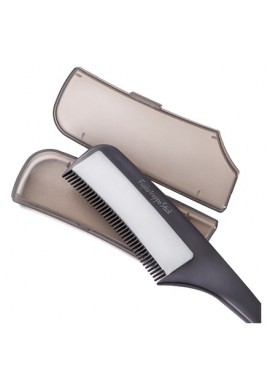
NatureLab Co. Diane Lotus Maegami Reset Pon
NL073
New
NatureLab Co. Diane Lotus Maegami Reset Pon
refreshing powder for bangs. Take care of the freshness and volume of your bangs all day long - wherever you are! Diane Lotus Maegami Reset Pon is an innovative powder in the form of a compact applicator, which quickly restores lightness and fluffiness to even the most limp and greasy strands. 5g
- Ean : 4580632122449
NatureLab Co. Diane Lotus Maegami Reset Pon
Diane Lotus Maegami Reset Pon is a refreshing powder for bangs by NatureLab Co. Take care of the freshness and volume of your bangs all day long - wherever you are! Diane Lotus Maegami Reset Pon is an innovative powder in the form of a compact applicator that quickly restores lightness and fluffiness to even the most limp and greasy locks.
Main advantages:
- instant refreshment of fringe - just a few light strokes are enough to eliminate the effect of limpness and excess sebum,
- also works on humidity and sweat - great on hot days or in humid weather,
- masks unpleasant odors of the scalp thanks to a delicate, pleasant aroma,
- compact version (5g) - ideal for a purse or cosmetic bag, always at hand!
Caring ingredients:
Contains natural plant extracts and oils, such as:
- marula seed oil, squalane, jojoba oil,
- extract of green tea, arnica, witch hazel, horse chestnut and grapevine,
- supports scalp care and protects hair from drying out.
Ideal for:
- people with thin, quickly greasy facial hair,
- looking for a handy cosmetic to instantly refresh their hairstyle,
- all those who want to maintain the "freshly washed fringe effect" all day long.
Capacity: 5g.
How to use:
- Remove the cap and gently tap the applicator on the back of your hand to make sure the powder comes out.
- Apply directly to greasy fringe, hairline or forehead.
- Remove excess powder with your hand or gently comb to give your hair the desired shape.
NatureLab Co. Diane Lotus Maegami Reset Pon - ingredients:
Silica, Talc, Mica, Sclerocarya Birrea Seed Oil, Squalane, Simmondsia Chinensis (Jojoba) Seed Oil, Camellia Sinensis Leaf Extract, Arnica Montana Flower Extract, Hypericum Perforatum Flower/Leaf/Stem Extract, Hedera Helix (Ivy) Leaf/Stem Extract, Aesculus Hippocastanum (Horse Chestnut) Seed Extract, Hamamelis Virginiana (Witch Hazel) Leaf Extract, Vitis Vinifera (Grape) Leaf Extract, Disodium Stearoyl Glutamate, Aluminum Hydroxide, Water, Butylene Glycol, Tocopherol, Fragrance.
No customer reviews for the moment.
30 RELATED PRODUCTS
-
 77,00 zł



-
Utena Me & Her Milky Gloss Gel
95,00 zł -

Kracie Ichikami Hair Styling Foam
69,00 zł -


Kracie Ichikami Hair Styling Water
65,00 zł -

Kracie Ichikami Hair Styling Cream
65,00 zł -

Kracie Ichikami Hair Styling Milk
65,00 zł
-

Kracie Ichikami Hair Styling Wax UV
62,00 zł -
 75,00 zł


-

Mandom Lucido-L Hair Styling Stick
60,00 zł -
 109,00 zł

-
 96,00 zł
 -
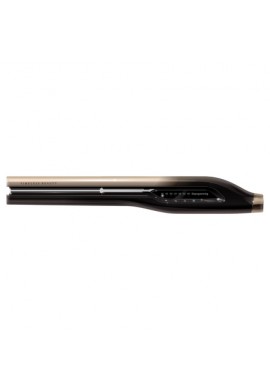
LUMIELINA Bioprogramming Hairbeauron 4D Plus...
3 059,00 zł -


I-ne Salonia Double ION Straight Iron
199,00 zł


-

 115,00 zł
 -

 115,00 zł
 -

Kao Liese Hair Playful Wax Move
66,00 zł -

Kao Liese Hair Playful Wax Natural
66,00 zł -
 93,00 zł
FAQ
How can I find a product on the website?
You can use the search bar at the top of www.japanstore.pl to type in keywords or even the name of the product you want.
Don't know the name of the product? No worries! You can find all products by brand by clicking on the Brands tab.
Don't know the brand or product name? No problem, you can click on one of the categories available on the home page!
To discover new products of the month, go to the New Products tab in the Information at the bottom of the page.
Can't find what you're looking for?
28
36
How do I know if a product is available?
We keep our store inventory up to date, and we try to avoid the situation where you buy a product that we don't have in stock.
The Japanese market is very dynamic and if for some reason a product is not available, you will be informed within 24 hours of ordering.
Can't find what you're looking for?
27
40
How can I place an order?
Don't worry, it's very easy! Follow the instructions below to quickly place your order.
- If this is your first order, please create account a Japanstore shop. If you already have an account log in with your email and password.
- Add the products of your choice to your shopping cart.
- After choosing your products you can see them in your shopping cart. There you can change the quantity of your products or remove them if necessary.
- If you have a promotional code, you can enter it in the "Vouchers" field. Do not forget to press "OK". The discount will be automatically deducted from your total order amount.
- Select your delivery method.
- NOTE: Remember to check the delivery address before you confirm your order.
- Finalize your order by choosing PayPal payment method. Your order has been accepted. You will receive an order confirmation by email.
Can't find what you're looking for?
26
41
How can I choose the delivery method?
At the ordering stage, you will be given the option to choose a delivery method. The currently offered delivery methods are: Economy Mail (economy letter - Japan Post), Air Mail (registered letter - Japan Post), EMS (courier service - Japan Post) and SEA Shipping (sea parcel - Japan Post).
NOTE: Be sure to check the delivery address before you approve.
Can't find what you're looking for?
23
44
How do I add gift packaging to my order?
Just email us at biuro@japanstore.pl.
NOTES:
- Products from one order cannot be packaged separately.
- Gift packaging is not provided for oversized products (not suitable for any of the available packaging formats).
Can't find what you're looking for?
24
46
How do I create a wish list?
Adding a product to your favorites is very easy! Click on the small heart on the right side of the product. It will automatically be added to your list.
To view your favorites list, click on the little heart located in the upper right corner of www.japanstore.pl! This tab allows you to conveniently find all the products you've enjoyed! You can also access this list under "My Wishlists"; in your Japanstore account.
Can't find what you're looking for?
15
49
How can I get additional product information?
If you have any questions about our products, please feel free to contact us: https://japanstore.pl/en/contact-us. Our consultants will be happy to inform you!
Can't find what you're looking for?
20
47
How can I get feedback from other customers about the products offered by Japanstore?
Go to the bottom of the page of the product you want, under the "Reviews" tab. Here you will find an overview of notes and reviews posted by our customers and a FAQ area where you can ask all your questions!
Can't find what you're looking for?
25
39


